With the latest PHP changes, our ancient ProjectReportMind/Statsmind third-party app finally died.
So I rebuilt the functionality we originally used using your modern etemplate based on your example app GitHub - EGroupware/example: Example app for development · GitHub.
It looks nice on the screen and solves the problems the front office uses for payroll and monthly intercompany billing. The only problem I haven’t been able to solve is printing. The first picture shows how it shows up in egroupware - really nice!
But when I try to print (either Print+P or the printer button), it shows everything in a window and basically doesn’t show the content. Right now we are screen capturing (like the above photo) and printing that which is annoying. When we do print, it looks like the following image:
I can’t figure out how to get it to print correctly.
Any suggestions on why the print function is not working?
I am not sure how to share the source files to attach it to this question but if someone explains I would be happy to upload
Hey,
are you using step 1 of our example app (So just a Ui.php file that echos html code) or do you use a template .xet file like in step 2?
Our print dialog is tuned to work well to print templates but does not print content inside an iframe well.
I assume that the content on your print screenshot is not actually missing. There is a scrollbar printed. So giving your iframe a @media print rule with {height: 100vh} might improve the results. But this will always cut off everything that does not fit on one page.
I would recommend using a template .xet file like our example app step 2. This will most likely fix the printing issue.
Hi Milan, I am using the template.xet and app.css files. While I mentioned stage 1, I did go through all the steps. My app is a lot simpler as it is just reading the timesheet entries for the desired time period and then displaying it as my boss was using with the old statsmind program written by VersusMind many years ago.
I did use some help from Google AI as I am not that familiar with PHP and I was in a rush. It was really good at figuring out error messages but was no help with the printing issue.
I am attaching the template and css files (and the Bo/Ui) in case that can help. I assume that a bunch of the css isn’t needed but is google slop.. But removing the css entirely or just having the print rule you listed above didn’t change the print behaviour either.
the issue seems indeed to be with your app.css. It forces a lot of rules on various elements that interfere with our frameworks print changes.
I attached a changed .css.
Two key takeawys:
Your app.css should scope its rules to your app. Otherwise it might interfere with other apps
forcing heights or overflow on (framework-)Elements should be done with caution since it might mess up our sizing (e.g. in print)
with the changed .css it now look like this for me
Thank you for your help! The good news is that it is possible to print the output (under certain conditions), but I have the following problem:
Scroll bars - If the list overflowed the space, you couldn’t see the end of the text. The good news is I figured out how to solve this by adding
#statsmind-index {
overflow-y: auto;
}
Adding this fixes the scroll issue but doesn’t solve the printing issue as I can only sometimes get the print to work.
If I use the printer button or Ctrl-P - I get the box still
If I select all the text (Ctrl + A inside the statsmind screen) then right-click on the text and select Print from the menu - I get the right output but the filter selections are blank
If I select all the text and press Ctrl-P - I get the correct result and it prints as expected - Yah!
But wait… it works well if the project list is short, but if the list of projects overflows the length of the page, it prints the filters on one page and the projects on a second. (If you use the second method to print, it flows properly but the filters are missing)
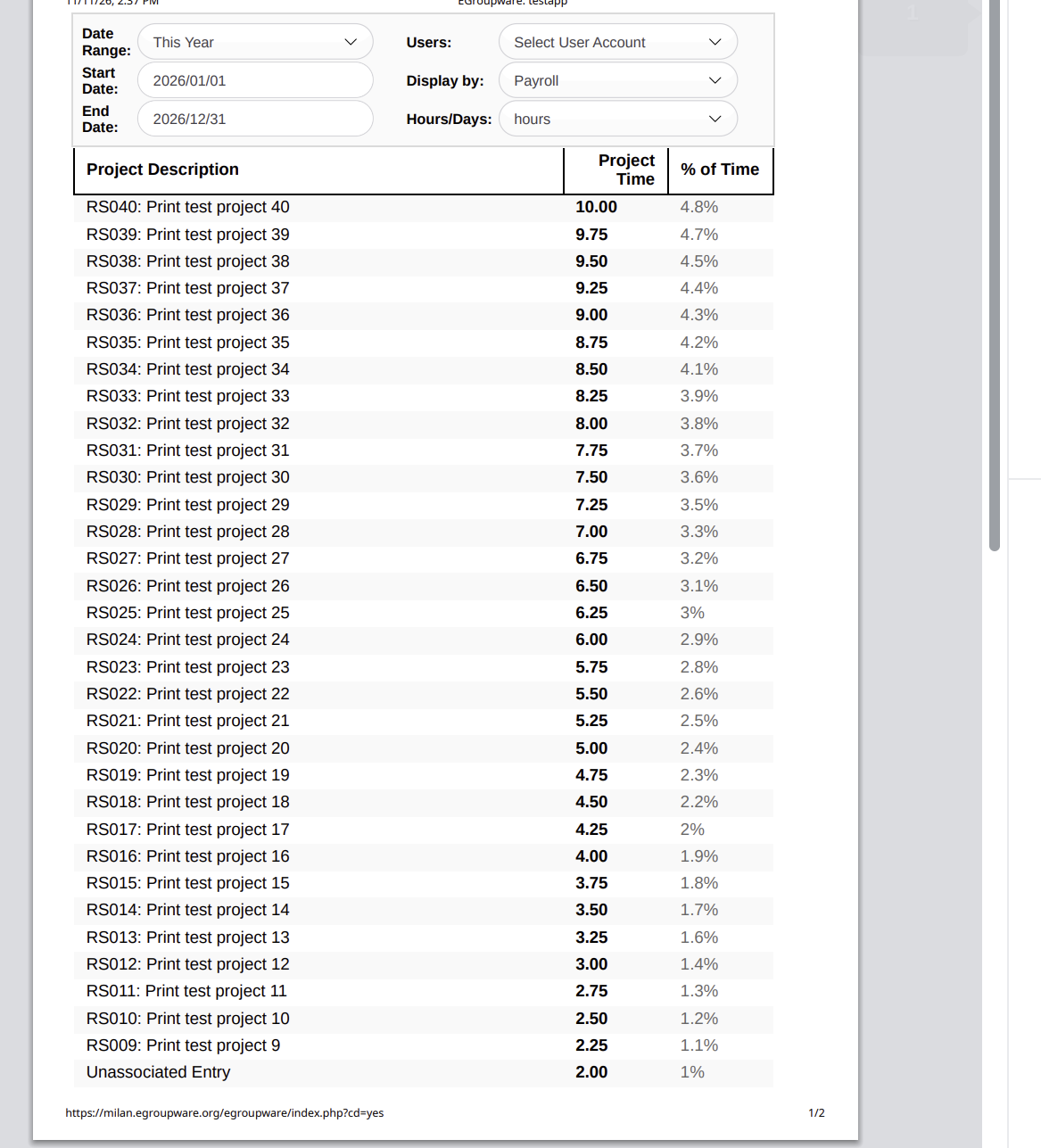
If the projects become longer than one sheet of paper, it prints as expected, with the filter at the top followed by the projects which overflow the page and go on to a second page as expected. (as seen here) EGroupware_ statsmind.pdf (40.0 KB)
So testing this has made be a bit crazy as the behaviour has a few variations.
I have no idea why using the menu, using the print button or using Ctrl +P give different results. I guess the good news is that there is a method that works but it would be nice if all methods worked the same way…
Either way I am learning - I tried using overflow instead of overflow-y, but that made it behave in yet another way (basically I couldn’t get the third case to work anymore).