Display problem on the calendar full edit dialog for the new events

Hi ,

The problem occurs when the web browser or the user desktop have a zoomed interface (most on big meeting screens) .

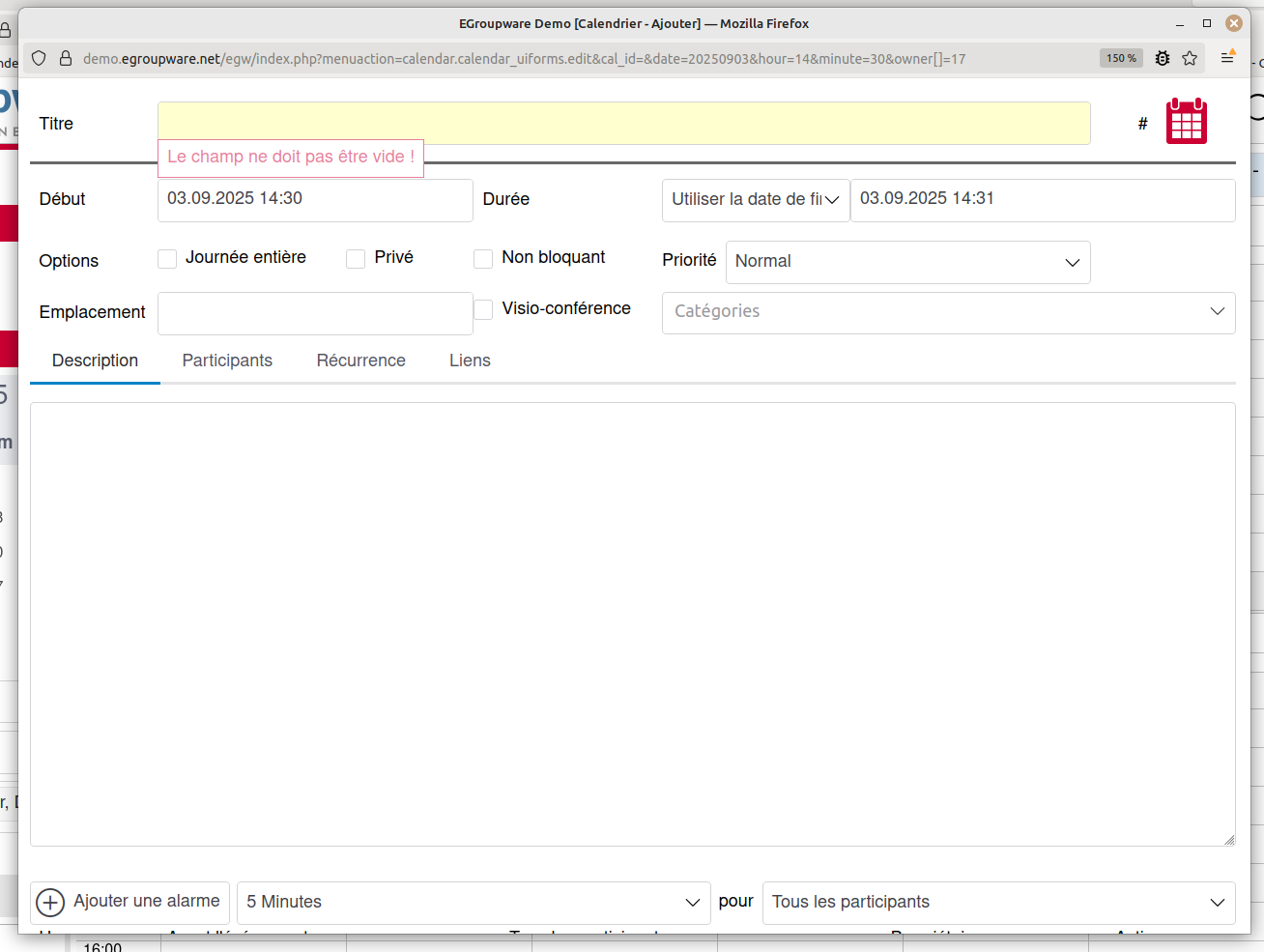
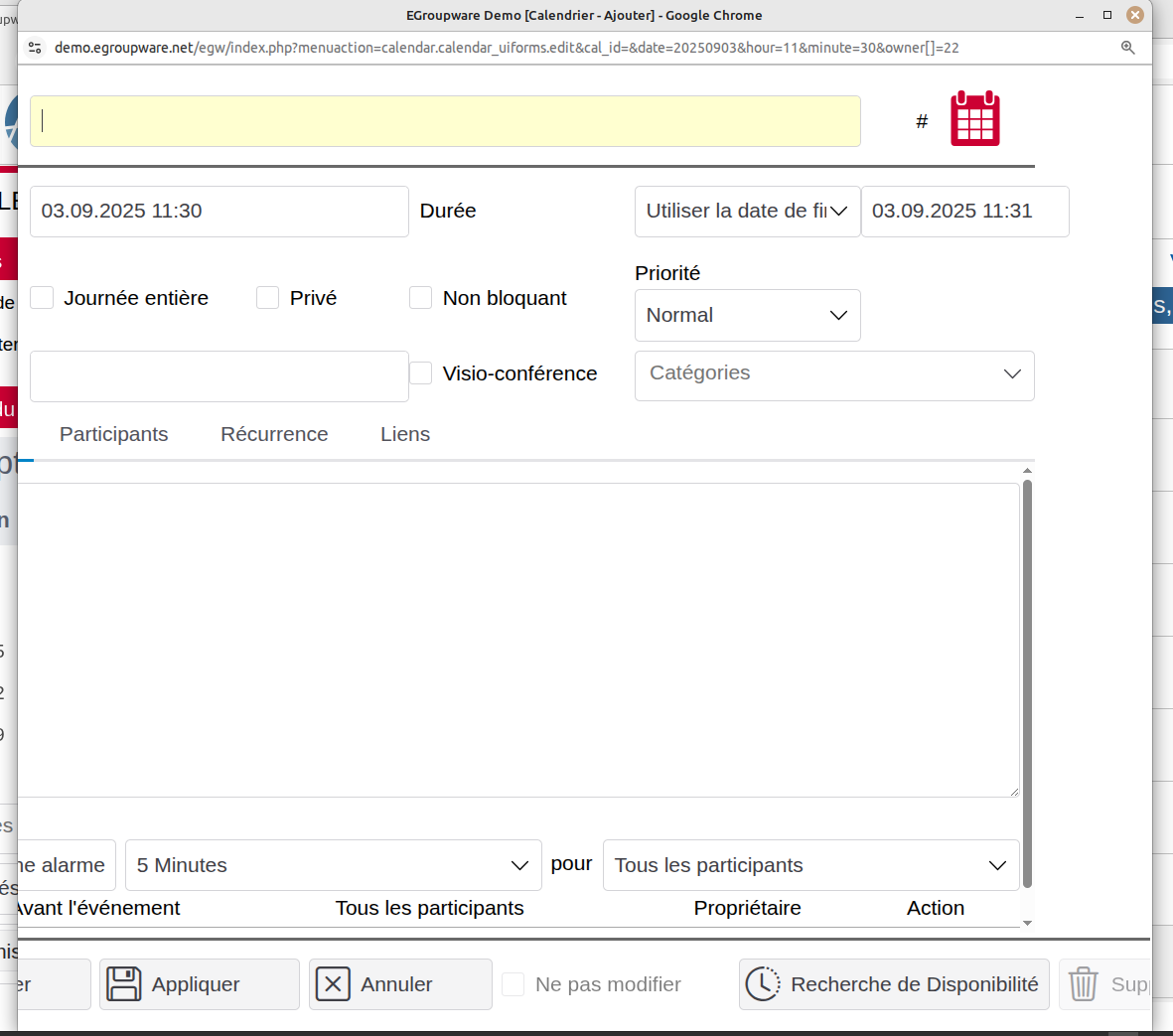
Here is 2 screenshots from 2 differents web browser :

1/ from Mozilla Firefox 142.0 with 150% zoom or above :

2/ from Google Chrome 140.0.7339.80 with 175% or above :

In both cases, the “Save” button is either hidden or truncated and the scroll bars are not present.

I told my users to dezoom the interface if the problem occurs or use the minimized dialog first but if you can find a solution to adapt the scale / activate scroll bars on thoses cases, if will be nice.

Regards,
Jon

Hi Jon.

I can’t test this right now because I’m travelling with a 1080 screen. Then is the button bar whole off the screen.

But I also look after several such meeting rooms with 65‘-75’ 4K monitors. We always set the OS (Windows) zoomed in there (usually 150% ?).
Then we rarely need to zoom in the browser.
That’s a good compromise.

I’ll see if I can get someone to look at it…

Stefan

Hi Stefan,

Thank you for your rapid answer.

I reproduced the problem with browser not zoomed but windows 11 interface zoomed 200% (most on mettings room or colleagues monitors).

I created a pull request with a css modification on fancy theme to trigger a scollbar when user interface is zoomed.

Hope this will help.

Regards,

John

We are experiencing this same problem, most problematically with a new user with a vision impairment. At display settings they can effectively use for day to day work, their monitor does not offer enough height to show the buttons and controls at the bottom of the dialog.

Could perhaps the dialog render a scroll bar if the window height is not large enough? Or perhaps allow the size for the tabbed widget (Description, Participants, etc.) to go smaller, as it seems to have a rather large minimum height?

The solution they are using, which is a source of annoyance for them, is to temporarily zoom out to get to the buttons, but then they need to kind of remember the text on those buttons because of the aforementioned vision issues.
Hi Steve.

What screen resolution, browser/operating system and maximum browser zoom level does the employee use?
Has he “zoomed” the OS as well?

Stefan

Hi !

This display problem reappeared with the new kdots template.

I did a new pull request ( Enhance popup styles with max-height and overflow by JohnyJohnJumper · Pull Request #256 · EGroupware/egroupware · GitHub ) to trigger a scrollbar on pop-up for browser/operation system zoom level >= 170%

Hope this will help.

Regards,
John

Thank you @ngegw for the patch : Kdots: fix popup footer buttons unreachable at high browser/desktop zoom · EGroupware/egroupware@5b5581c · GitHub

I tested it and it’s ok